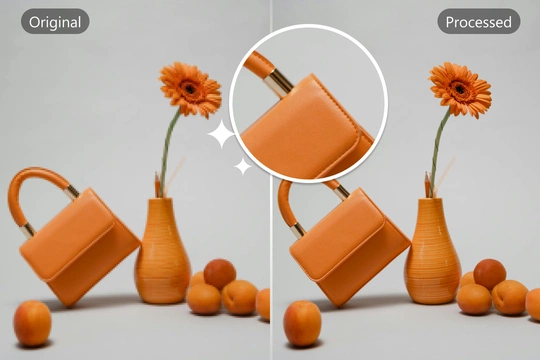
Have you ever captured a precious moment only to find the photo blurry? Or downloaded a perfect image material that is too pixelated to use? Don't delete them just yet. Our AI Image Upscaler is here to save your low-quality images. Powered by advanced Generative AI technology, it intelligently fills in missing pixels, turning grainy, low-res photos into crisp, high-definition masterpieces in seconds.
What is an AI Image Upscaler?
More Than Just "Resizing"
Traditional resizing tools merely stretch pixels, resulting in blocky and blurry "mosaic" effects. Our AI Image Enhancer works differently. It uses Deep Learning networks trained on millions of high-res images to "understand" what the details should look like. It reconstructs textures, sharpens edges, and removes digital noise, effectively "drawing" new details to increase resolution naturally.
Intelligent Detail Restoration
Whether it's the fabric texture on a dress, the strands of hair in a portrait, or the lines in an anime drawing, the AI accurately identifies the subject and enhances clarity without over-sharpening. It breathes new life into old, damaged, or compressed photos.
How to Upscale Images Online?
Enhance your photo quality in three simple steps:
Step 1: Upload Image Click or drag your image file to the upload area. We support common formats like JPG, PNG, and WebP.
Step 2: AI Processing The system will automatically analyze the image and begin the upscaling process. No complex parameter adjustments are needed—the AI handles the technical work for you.
Step 3: Preview and Download Once processed, you can preview the "Before vs. After" effect. Satisfied with the crisp result? Download the high-resolution image directly to your device. If you also have images with unwanted text or logos, try our Image Watermark Remover to clean them up.
Core Features & Advantages
Unlimited Upscaling Possibilities
We break the barriers of image quality. From restoring century-old family portraits to enhancing low-res screenshots for printing, our tool adapts to various scenarios, providing professional-grade restoration results.
Natural & Authentic Visuals
Unlike some tools that create a "waxy" or fake look, our algorithm prioritizes naturalness. It balances noise reduction and detail retention, ensuring that skin tones look real and landscapes retain their organic depth.
Workflow Efficiency
For designers and content creators, time is money. Our tool processes images rapidly in the cloud, allowing you to batch-process assets for your website or social media. Need to create original high-res assets from scratch? Check out our Text to Image generator.
Common Use Cases
E-commerce & Product Photography
Crisp product images increase conversion rates. Upscale small supplier photos to meet the high-resolution requirements of Amazon, Shopify, or eBay without organizing a reshoot.
Old Photo Restoration
Bring blurry, yellowed, or grainy old family photos back to life. The AI removes noise and enhances facial details, making memories look as vivid as if they were taken yesterday.
Anime & Digital Art
Anime lovers often struggle with low-res wallpapers. Our specialized algorithm works exceptionally well on 2D illustrations, upscaling them to 4K or 8K while keeping lines sharp and colors vibrant.
Printing & Merchandising
Ensure your designs look great in print. Convert web-quality images (72 dpi) into print-ready assets (300 dpi) for posters, T-shirts, or marketing brochures.
Frequently Asked Questions (FAQ)
Q1: What is the difference between this and Photoshop's resampling?
Photoshop uses mathematical interpolation (like Bicubic) which often results in blur. Our AI Upscaler uses "Generative Adversarial Networks" (GANs) to hallucinate and reconstruct realistic details that weren't there, providing a much sharper result.
Q2: Can I use the upscaled images for commercial purposes?
Yes. As long as you own the copyright to the original image, you retain full rights to the upscaled version and can use it for commercial projects.
Q3: Does it work on very blurry images?
It works best on images that have some detail but are low resolution or slightly noisy. For extremely blurry or unrecognizable images, the AI might struggle to reconstruct accurate details, but it will still significantly improve smoothness.
Q4: Are my uploaded photos safe?
Absolutely. We respect your privacy. All uploaded images are processed securely on our servers and are not stored permanently or shared with third parties.